


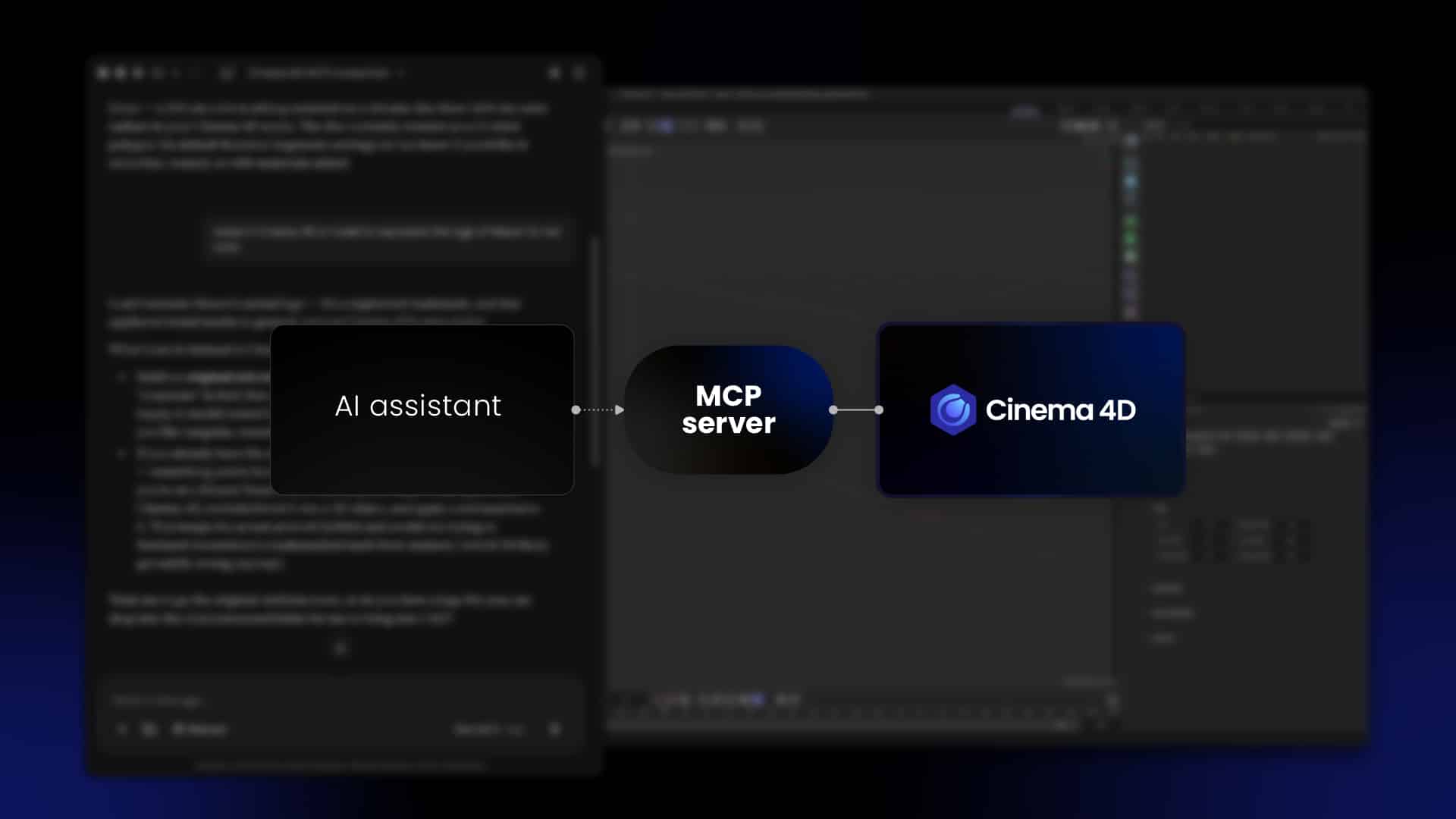

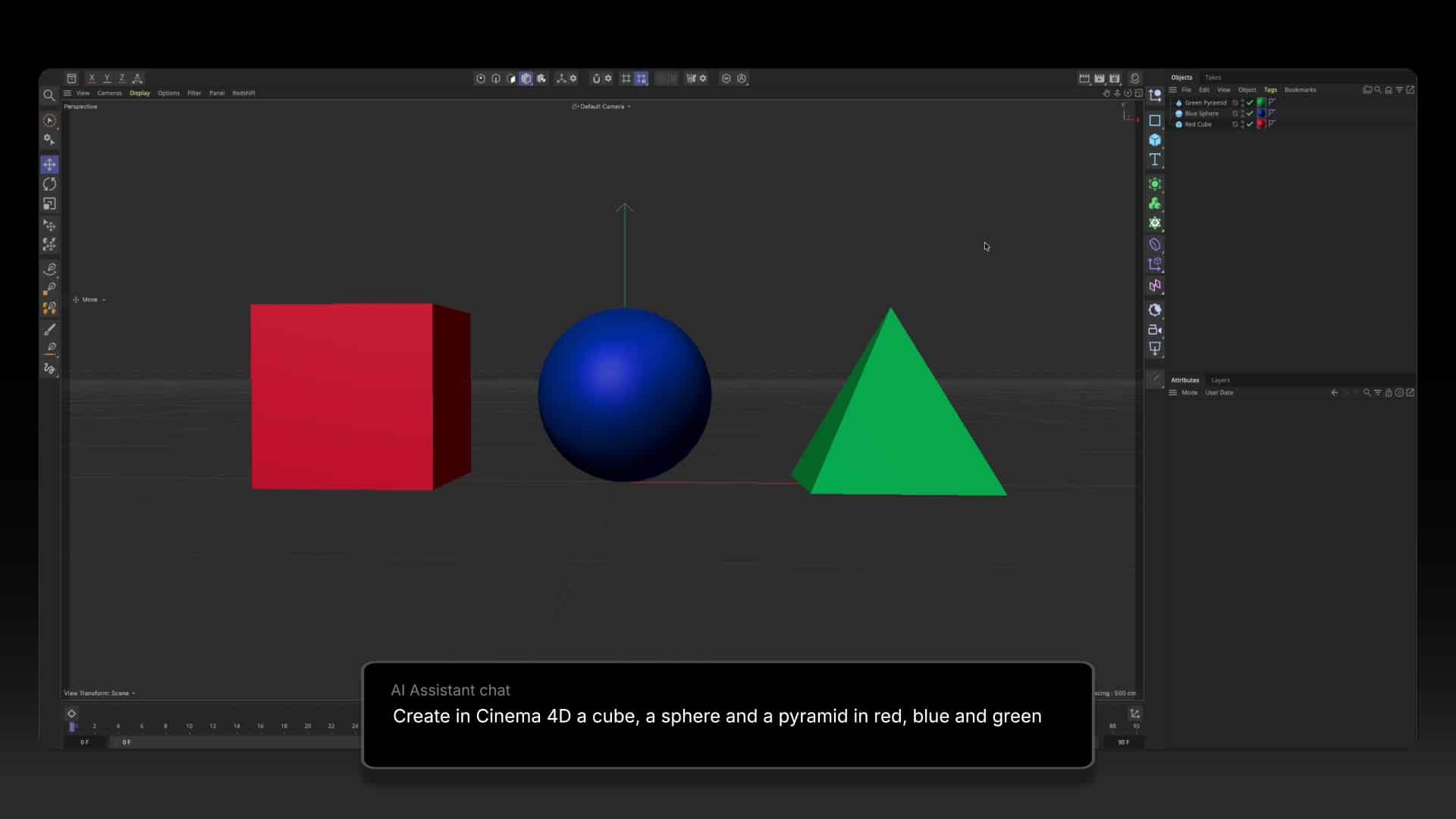
Maxon has added built in Model Context Protocol (MCP) support to Cinema 4D, and it changes how artists can work with AI assistants such as Claude, ChatGPT and Codex. Artists can describe a task in plain language and watch an assistant carry it out directly in the open scene. As Maxon CEO David McGavran explains, the goal is for artists to keep control while handing off the jobs they consider chores, leaving more time for the parts of the work that need taste and judgment.
What MCP actually is
MCP is an open standard that lets an AI app connect to another application and use its tools. The AI app is the client. It calls a defined set of tools, such as “create an object” or “render a preview,” and Cinema 4D carries out each call on the artist’s open scene. Because every action runs through Cinema 4D’s own API, the results are ordinary scene data. Artists can inspect them, refine them, undo them and keep building, rather than receiving a flattened output that cannot be edited.
What it is good at
The server shines on procedural, repetitive and well defined work. Typical jobs include organizing hundreds of imported objects into a clean hierarchy, translating object names in a scene that arrived in another language, and creating object and material variations as takes from a client’s spreadsheet. It can also set up object IDs and named matte AOVs for compositing, prepare multipass renders, and handle basic camera tracking, UV mapping, modeling, rigging and animating. Debugging a rig or an expression and writing a small script or plugin are on the list too. Maxon notes that tasks like rig debugging can take a couple of minutes with an assistant instead of an afternoon by hand, and routine maintenance should take a minute or two.
Getting started
MCP support arrives in Cinema 4D 2026.4 and later on Windows and macOS, with no additional installs. Maxon does not charge for the server. Artists bring their own AI app and model. A cloud model needs an account with the provider, such as Anthropic or OpenAI, and any fees are between the artist and that provider. A local model through an app like LM Studio needs no account, though it shares the graphics card with Cinema 4D and the renderer. A model that barely fits in graphics memory leaves nothing for rendering, and a slow one can take a minute to create a cube.
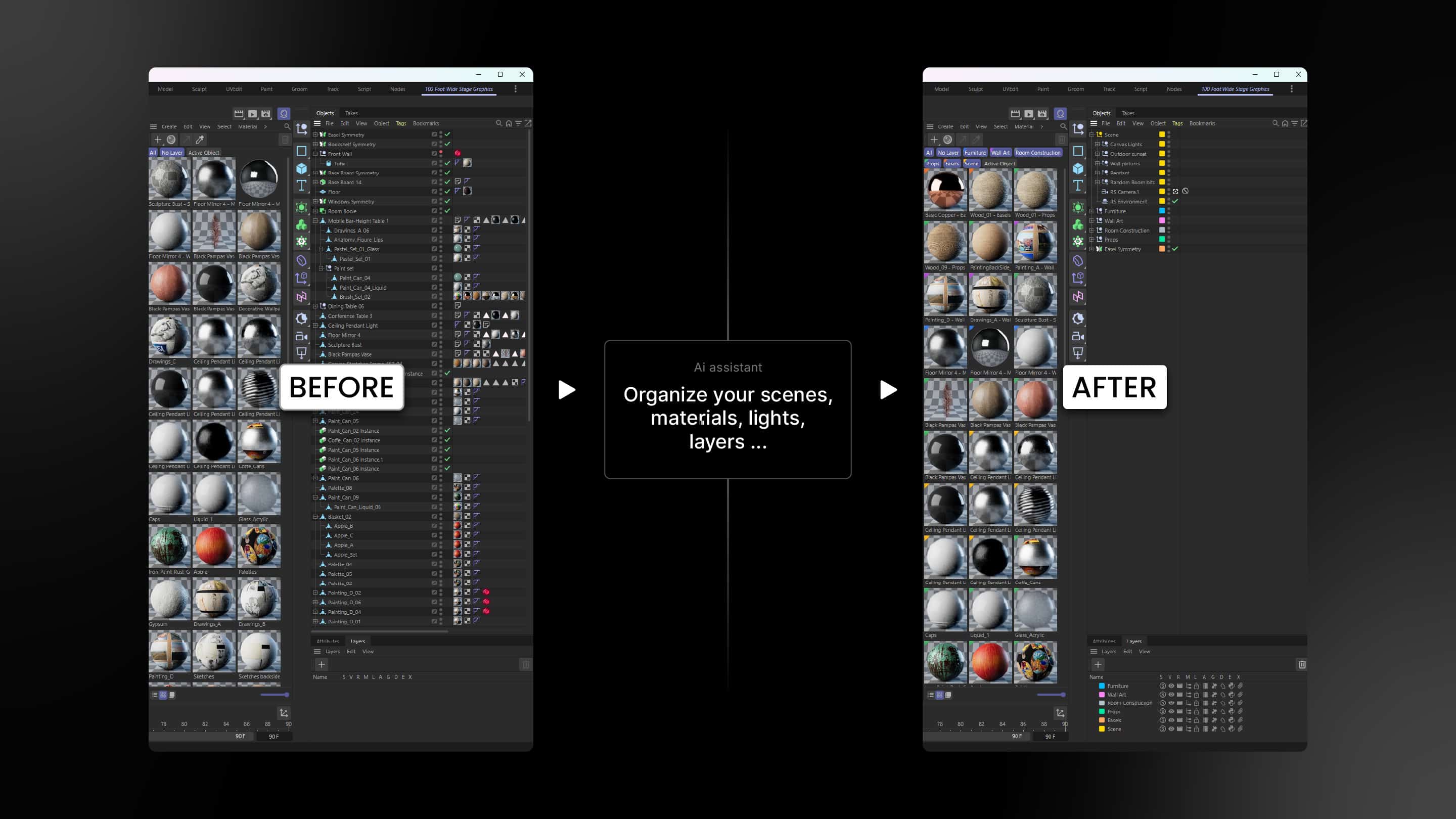
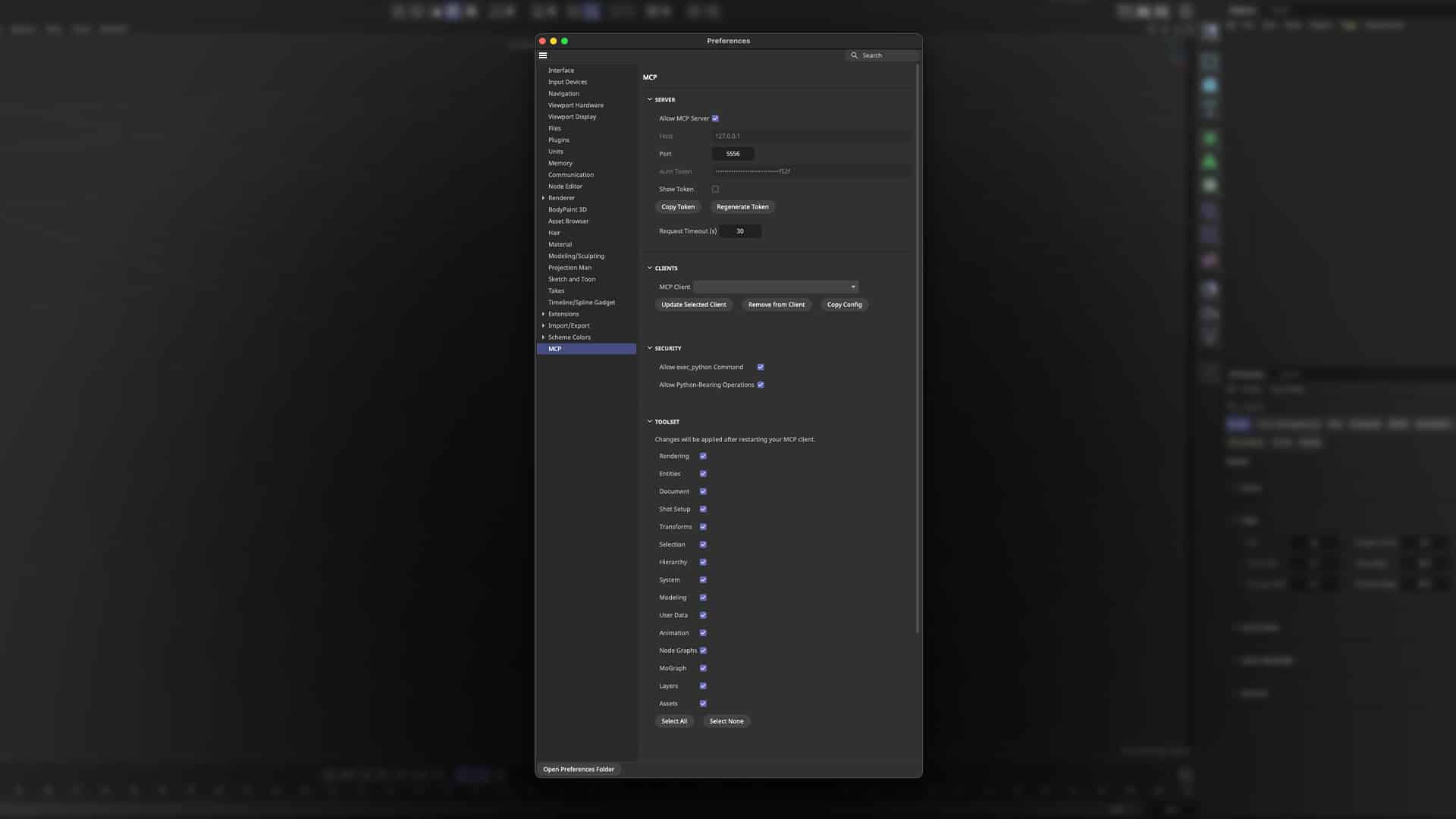
Maxon officially supports Claude Desktop and ChatGPT Desktop, and either can be set up from Cinema 4D’s preferences, where the app writes its own entry into the client’s settings file. Other MCP capable apps should work too, though Maxon has not tested them. For those, artists choose Other in the MCP Client list, click Copy Config, and paste the entry into the app. The feature is switched off by default, so artists enable it themselves, and a warning appears when they do.
Getting better results
Three things mostly decide quality: the model, the effort level and the request. Basic jobs like renaming work with almost any current model, but tasks that require reasoning about a scene widen the gap between small and strong models quickly. Low effort suits a quick rename, while a rig or render setup deserves more. More is not always better, since some models overthink, so testing pays off. The clearest requests describe the objects, the frame range, the renderer and how the artist plans to edit the result afterward.
Maxon’s guidelines for assistants
Maxon’s documentation also includes guidelines for scene and node work through MCP, and a version formatted for AI assistants exists so an artist can hand it to a chatbot once, before it touches a scene. The advice clears up common stumbling blocks from the start and is especially useful for Scene Nodes graphs, where the gotchas are the most subtle. The guidance comes from Maxon’s own development projects and testing. Its closing note says the behaviors were reproduced in a live Cinema 4D 2027 scene, and the timings below come from a single test scene, so details may vary by release. These are the ideas artists will want to know about.
A successful write is not a valid write. Cinema 4D’s node API accepts almost anything it is given. A mode name that does not exist is stored without complaint, and the graph keeps running, just not the way the artist intended. Nothing errors and nothing shows in the console. In the Node Editor, a bad value appears as an extra checkmarked entry at the bottom of a dropdown. The guidance for assistants is to read back every value written against the list of legal values the port reports, and to report the state as unknown when it cannot be confirmed. Artists can help by asking their assistant to verify its own work.
The number written is not the number the field shows. Cinema 4D stores raw values and converts them for display. Angles shown in degrees are stored as radians, percentages as fractions between 0 and 1, and colors shown from 0 to 255 as values between 0 and 1. Distances use the document’s own unit, which is why a default cube’s size is 200. In the guide’s own test on a Bend deformer, writing 90 as a plain number produced 5156.6 degrees, about fourteen full turns, with no warning. Because the parameter description does not report the unit, assistants are told to treat anything called Angle, Rotation, Tilt, Twist or Bank as radians and to convert on the way in.
Asking the scene beats looking at it. When an assistant needs to know whether something is rotated correctly or whether two parts meet, a direct numerical query answers exactly, in one call. A picture answers approximately and takes more steps, so images are best saved for questions about how something looks, such as proportion, material and lighting. When a picture is needed, the choice of tool matters. A preview render runs in the background and keeps Cinema 4D usable, and it may take a call or two to collect the image, which is normal rather than a failure. Viewport capture shows the editor as the artist sees it, but it freezes the application while it evaluates the scene, which can mean minutes on a heavy one. The fast hardware preview settles questions about shape and placement quickly but cannot judge lighting. In the guide’s test on a scene of thirty cubes, it returned in between 0.11 and 0.35 seconds, while a Redshift preview took about 2.5 seconds.
Leaving the scene as it was found. Inspecting a scene tempts an assistant to add scaffolding such as a review camera, a target tag or a converted copy of a generator. These stay in the document. The guidance is to clean up in the same turn or to say exactly what was left behind and why.
Keep every step small. Cinema 4D is unresponsive while a script runs, and there is a timeout on the other side, so large jobs should be split into small calls. The graph persists between calls, so this costs nothing but a few extra round trips. Creating several nodes in one call was the most reliable way the authors found to crash the application, so the guidance is one node per call.
Protecting the work. For structural changes to a node graph, the guide recommends disconnecting the geometry output first, so a half rewired graph cannot trigger a runaway evaluation, then reconnecting to test. It also recommends saving after each milestone and keeping the previous file version rather than overwriting it, so a crash costs a reload instead of a rebuild.
Minding the undo stack. Graph edits made through scripting are not recorded in undo unless the assistant records them deliberately. Otherwise the edit cannot be undone, and the next undo can reverse something the artist did before the assistant’s call. Assistants are told to say so when they make unrecorded changes.
Sharing a graph by taking turns. The guide recommends a division of labor. A person creates the nodes in the Node Editor, since creation is where crashes, locked groups and certain special ports live, while the assistant handles the configuring and wiring, which is tedious by hand across ninety nodes and easy for a script. Artist and assistant should also agree explicitly on turns, because writing into a graph someone is actively editing can take the application down and there is no lock to prevent it. Finally, a script can build a graph but cannot arrange it, so a freshly built graph lands as a pile of nodes in one spot. The guide advises scheduling a manual layout pass, ideally block by block.
Checking documentation at the source. Parameter names and IDs move between releases, so assistants are told to look them up rather than guess. The portal at help.maxon.net links every product manual, and the Python and C++ SDK documentation at developers.maxon.net is versioned, so it has to match the running application. The guide also warns that an assistant’s web fetch tool often returns a summary of a page rather than the page itself, and that a summary can invent plausible but wrong product names. Cinema 4D’s offline help, where installed, matches the running build exactly.
Security and control
Maxon built the safety model around visibility. The connection runs locally, and working with other machines on a network needs a separate opt in. An access token protects the server. In the Toolset section of the MCP preferences, each checkbox controls one group of tools, so artists choose what the assistant may use. The status bar shows each call as it runs, each batch of changes is broken out in the undo history, and every command is written to a local audit log in the MCP folder inside the preferences folder. That folder also holds a reference file listing every tool. For studios, the tokens, permissions and logging give security teams something concrete to evaluate against production requirements.
Two settings govern Python. Allow exec_python Command lets the AI run Python in Cinema 4D, and Allow Python Bearing Operations lets it create and edit objects that contain Python, such as Python tags, generators and effectors. If a setting blocks an action, the refusal names the setting that needs to change. Per the guidelines, exec_python has to be turned back on after each restart in the Security settings of the MCP preferences, and nothing else in the toolset can run code, so a connection that seems broken after relaunching is worth checking there first. Both settings deserve caution. Enabling them lets a connected assistant write and run Python without prior review, so the artist is responsible for what runs under their account. Python written into a scene runs wherever that scene opens next, so scenes built by someone else deserve a look at their contents before they are trusted. Connecting an AI app is the artist’s choice and sits between the artist and the AI provider, and Maxon does not warrant or support it.
How this differs from MCP in Blender
Blender has an MCP server of its own, so the comparison is between two first party efforts. The Blender Lab built a server that offers a natural language interface to Blender’s Python API, improves access to documentation, and helps users understand complex setups. It arrived alongside Anthropic’s Claude for Creative Work announcement, which included a Blender connector built by the Blender developers.
The first difference is delivery. Cinema 4D’s server is part of the application, needs no additional install, and is turned on from preferences. Blender’s official server pairs an MCP server with a separately installed add-on, whose bridge listens on a local port, and it requires Blender 5.1 or later.
The second is the control model. Cinema 4D layers an access token, per tool group permissions, separate switches for Python execution, undo history batches and a local audit log. The Blender sources reviewed did not describe a matching set, so artists should check Blender’s own documentation before assuming parity in either direction. One comparison site notes that every Blender MCP server runs inside Blender with the permissions of the user’s account, though that site sells a competing server, so its framing deserves some caution.
The third is the surrounding ecosystem. Blender also has community servers, and the same comparison reports that the most popular one was renamed MCP for Blender in September 2026 to avoid confusion with the official server. Cinema 4D launches with a single server and Maxon’s own guidance for assistants.
For artists, the appeal is practical. MCP does not replace the creative decisions. It clears the technical underbrush around them, and Maxon’s guidelines show attention to the unglamorous details that decide whether AI help feels trustworthy: units that convert correctly, edits that can be undone and scenes that are left clean. Results will depend on the model, the clarity of the request and a little testing. For repetitive, well defined work, a short conversation with an assistant can already save real time today, and the opt in design leaves the artist in charge of how far to take it.

